September 18th, 2009
Today we’re covering the RSSCloud WordPress Plugin.
The RSSCloud WordPress Plugin is written by Joseph Scott, a heavy WordPress developer who focuses his efforts with the blogging API in WordPress. I’ve been following his blog for years now, his knowledge in these areas of blogging are of the highest caliber.
RSSCloud (rsscloud.org) is a specification and protocol written by Dave Winer to provide instant notifications of new blog content to subscribers. It allows for a service or web application to add itself to a list on your blog that you later notify when you publish new content. It is similar to the Update Services / Ping feature in WordPress except that the blog author does not need to manage the list of services he/she needs to notify. The following sketch explains the process quite well.
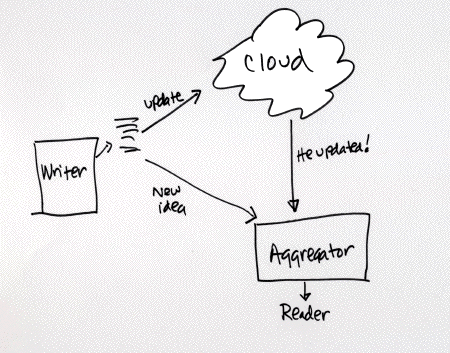
One myth is that this replaces feeds. In reality, RSSCloud only enforces the standardization of using RSS 2.0 specification for feeds as it is the only feed specification that allows for the RSSCloud protocol (namespace) to be added. The use of RSSCloud also eliminates unnecessary network traffic, as the subscription service would no longer need to pull your feed on a regular basis, Only pulling your feed when there is new content.
The RSSCloud WordPress Plugin enables WordPress to become RSSCloud aware, adding the cloud tag to your blogs RSS 2.0 feed, accepting requests from feed subscription services, and sending notifications to such feed subscription services when you publish new blog posts.
You can learn more about the RSSCloud specification at rsscloud.org and download the new RSSCloud WordPress plugin at WordPress.org/extend/plugins/rsscloud/
Please feel free to leave comments or feedback for the show either by using our contact form or calling (614) 859-9007.
Podcast: Play in new window
| Download
Filed under: Anyone, Extend, Feeds, Posts
— angelo @ 2:48 pm — no comments
Tags: cloud, dave winer, feed, instant, joseph scott, notifications, ping, publish, rss, rss2, rss2.0, rsscloud
June 29th, 2009
Today we’re covering the WP Greet Box WordPress plugin.
The WP Greet Box plugin adds a welcome box to the top of your blog post and/or pages based on where the visitor came from. The box can be extensively customized and special greetings can be added. The plugin is useful if you wish to help new users find additional content on your blog as well as encourage visitors to subscribe to your feed or tweet the blog post they are currently viewing.
Features include:
- Extensive list of greetings for sites such as Google, Yahoo search, Twitter, Facebook, LinkedIn, etc…
- Ability to add custom greetings and greeting icons
- Open links in greeting box in new browser windows option
- Display related posts within your welcome boxes to help visitor find additional relevant content
- Import/Export options
- Extensive documentation to add greetings to your WordPress theme
Plugins Podcast Skill Level: Any
To learn more about the WP Greet Box plugin, please go to http://wordpress.org/extend/plugins/wp-greet-box/.
Podcast: Play in new window
| Download
Filed under: Anyone, Extend, Feeds, Pages, Posts, Themes
— angelo @ 6:00 pm — 2 comments
Tags: Comments, styling, subscribe, theme
January 8th, 2009
This is a shortened version of episode 1 covering the Blubrry Powerpress podcasting plugin. We will try to keep all episodes under 15 minutes for now on, sorry all.
Blubrry Powerpress is a lightweight WordPress plugin that adds only the essential features to your WordPress blog to turn it into a podcasting system. Below are some key features.
- Easily add podcast episodes to blog posts and pages
- Integrated audio/video media player
- iTunes RSS tags and album over art
- Podcast only RSS feed
- iTunes Ping
- Media size detection and duration in seconds detection for mp3s
- 3rd party statistics integration
In addition to the core fetureas above, the plugin has the ability to easily import Podpress episodes and settings so users can easily migrate switch plugins.
Podcast: Play in new window
| Download
Filed under: Extend, Feeds, Pages, Posts
— angelo @ 2:11 pm — 2 comments
Tags: blubrry, podcast, podcaster, podcasting, podpress, powerpress
January 7th, 2009
Tonight’s episode I’m covering the Blubrry Powerpress podcasting plugin.
Blubrry Powerpress is meant to be a very lightweight plugin to add only the essential features to your wordpress blog to turn it into a podcasting system. Below are some key features.
- Easily add podcast episodes to blog posts and pages
- Integrated audio/video media player
- iTunes RSS tags and album over art
- Podcast only RSS feed
- iTunes Ping
- Media size detection and duration in seconds detection for mp3s
- 3rd party statistics integration
In addition to the core fetureas above, the plugin has the ability to easily allow Podpress (an older WordPress podcasting plugin) users to easily migrate to Blubrry Powerpress. In this episode Angelo will explain how this works and what steps to take in case you decide to revert back to Podpress.
Podcast: Play in new window
| Download
Filed under: Extend, Feeds, Pages, Posts
— angelo @ 8:32 pm — 1 comment
Tags: blubrry, podcast, podcaster, podcasting, podpress, powerpress